KMP uses Microsoft's SQLSRV driver (PHP extension), to connect to a MSSQL database. This guide explains how to install this driver on Windows.
Supported PHP versions:
- PHP v5.4.32
- PHP v5.5.16+
- PHP v5.6.4+
PHP v7.* in not supported.
If you do not have PHP installed yet, follow this guide: PHP installation on IIS7, IIS7.5, and IIS8.
Installation
Download the SQLSRV32.EXE file from the official Microsoft website.
Double click on the downloaded file. It is a self-extracting archive. It will ask you where to extract the files. Use a temporary target folder for this, you would need only one of the extracted files.
Check the extracted files. You need the php_sqlsrv_XX_nts.dll file, where XX is your PHP version, e.g. for PHP v5.6 Non Thread Safe you would need this driver:
Copy the driver file to the PHP extensions directory. If you're not sure, check the "extension_dir" parameter in the php.ini file.
To load the sqlsrv dirver, add the following line to the php.ini (adjust the name if needed):
Also, you would need to install the following packages from Microsoft on the web server:
You would need to download the "vcredist_x86.exe" file from both pages, launch it and complete the installation.
Install the ODBC Driver. Download x86 or x64 depending on your Windows edition.
Restart the web server.
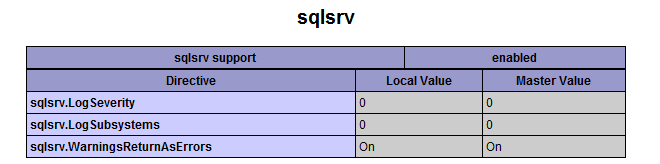
To check if the driver has been successfully loaded, run a script that calls phpinfo().
Search for "sqlsrv" on that page (use Ctrl-F shortcut in your browser). If sqlsrv driver is installed correctly, you should see something like this:


 Categories