| |
| |
Translations Available for Download (v6.*)
| Author: Edward Hardin Reference Number: AA-00425 Views: 27966 Last Updated: 06/21/2017 07:48 AM |
25 Rating/ 2 Voters
|

 |
This page contains the most recent collection of KnowledgeBase Manager Pro user interface translations. Translations are provided as text files. To import a language pack to your knowledge base, follow these steps: - Download a desired language pack from this page below to your computer.
- Go to Administration > Interface Languages.
- Click the "Add New Language" button.
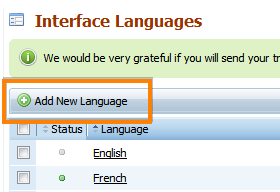
- Enter a name and a 2 or 3 letter code (e.g. EN, FR, DEU, ES, etc).
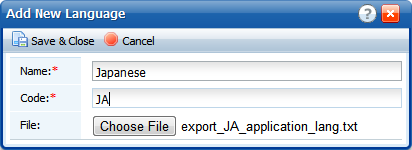
- Choose the language pack file that you've downloaded.
- Click "Save & Close".
- Now you and other users can switch to the imported language.
These language files are compatible with KMP v6.0.*
Custom Fields
| This article applies to the following versions of Knowledgebase Manager Pro: | 6.0.3,6.1.*, 6.2, 6.2.2 |
|
|
|
|

 Categories